Public Evidence Verification
Public Evidence Verification is part of the core audit layer and is available on every plan. This page is readable without signing in so external verifiers can land on it.
What this is
Every Behavry audit event is hash-chained (see Decision Trace). That means any party who holds an event hash can prove two things without needing to read the event contents:
- Existence — the event hash is in the Behavry audit log for some tenant, at some timestamp
- Integrity — the chain from that event back to an earlier anchor is intact (no tampering)
Public Evidence Verification (PEV) exposes this as a rate-limited, unauthenticated HTTP endpoint. Auditors, regulators, customers, and downstream verifiers can confirm an event without needing credentials for the tenant that generated it.
The endpoint
GET /api/v1/public/verify?hash={event_hash}
- No authentication required
- Rate-limited (per-IP, 60 requests per minute by default)
- Returns no event content — only existence + integrity
Response
{
  "found": true,
  "tenant_public_id": "acme",
  "timestamp": "2026-04-08T14:23:11Z",
  "chain_intact": true,
  "anchor_hash": "a3f2...",
  "anchor_timestamp": "2026-04-08T14:00:00Z"
}
found— whether the hash exists in the log at alltenant_public_id— the tenant's public-facing slug (not the internal UUID)timestamp— when the event was writtenchain_intact— whether the hash chain from the event back to the nearest anchor is uninterruptedanchor_hash/anchor_timestamp— the nearest periodic chain anchor, so a verifier can compute an independent hash and cross-check
Not found
{ "found": false }
Returned when the hash isn't in the log. Rate-limited the same as found responses to prevent enumeration attacks.
What this does not expose
PEV returns zero event content. No payload, no DLP findings, no identities, no policy reasons, no targets. A third party can prove an event exists; they cannot read what it was about.
This is the right default for a public endpoint. Tenants that want to expose event content to specific verifiers do it through the authenticated API under admin approval.
Periodic anchors
To make independent verification practical, Behavry writes a chain anchor every hour:
- An anchor is a pair
{timestamp, hash}wherehashis the current head of the audit chain - Anchors are published to a tenant-configurable anchor endpoint (by default, none — tenants opt in)
- Public verifiers compare
anchor_hashfrom a PEV response against an independently-received anchor to confirm the chain hasn't been rewritten after the fact
Use cases
- Auditors verifying that a specific compliance event exists
- Customers confirming that their vendor actually produced a Decision Trace they were told about
- Regulators asking for cryptographic proof of record-keeping without network access to the tenant
- Incident responders confirming a specific action happened and wasn't spoofed
Rate limiting and abuse
- Per-IP rate limit (configurable, default 60/min)
- Per-tenant rate limit across all IPs (prevents a single tenant's logs from being probed into DoS)
- No batch endpoint; each request checks one hash
- Enumeration is infeasible: the hash space is 2^256
Verifying a full evidence package
Hash lookup answers "does this event exist". Verifying an entire APR evidence package — the artifact you hand to an auditor — is a separate job, and it no longer requires anything from Behavry.
The hosted verifier
verify.behavry.ai accepts a package by upload or URL and returns a per-check report.
It is stateless: nothing submitted is stored, logged, or forwarded. A submitted package carries an audit trail out of someone else's regulated environment, so retaining it would be the wrong default.
The offline CLI
pipx install behavry-verify
It runs the identical checks air-gapped and depends on cryptography alone, so there is as little to install and audit as possible. Exit codes 0 / 1 / 2 drop into CI.
The source is public under Apache-2.0 at Behavry-ai/behavry-verify. A verifier that cannot be read, and cannot be separated from the product it checks, persuades nobody.
Every check runs independently
Unlike a verifier that returns on first failure, a tampered package reports signature valid alongside event count wrong and chain broken. That combination is what tells an auditor the package was genuinely Behavry-signed and altered after export.
Checks that cannot meaningfully run report SKIPPED — never PASS.
The trust anchor is the other half
A package cannot be verified from its own contents. public_key_hint is a truncated fingerprint, not a key — and signing keys are per tenant, so there is no single global key to fall back on.
Administrators download their tenant's anchor from Administration → Audit Integrity, and hand it over alongside the package.
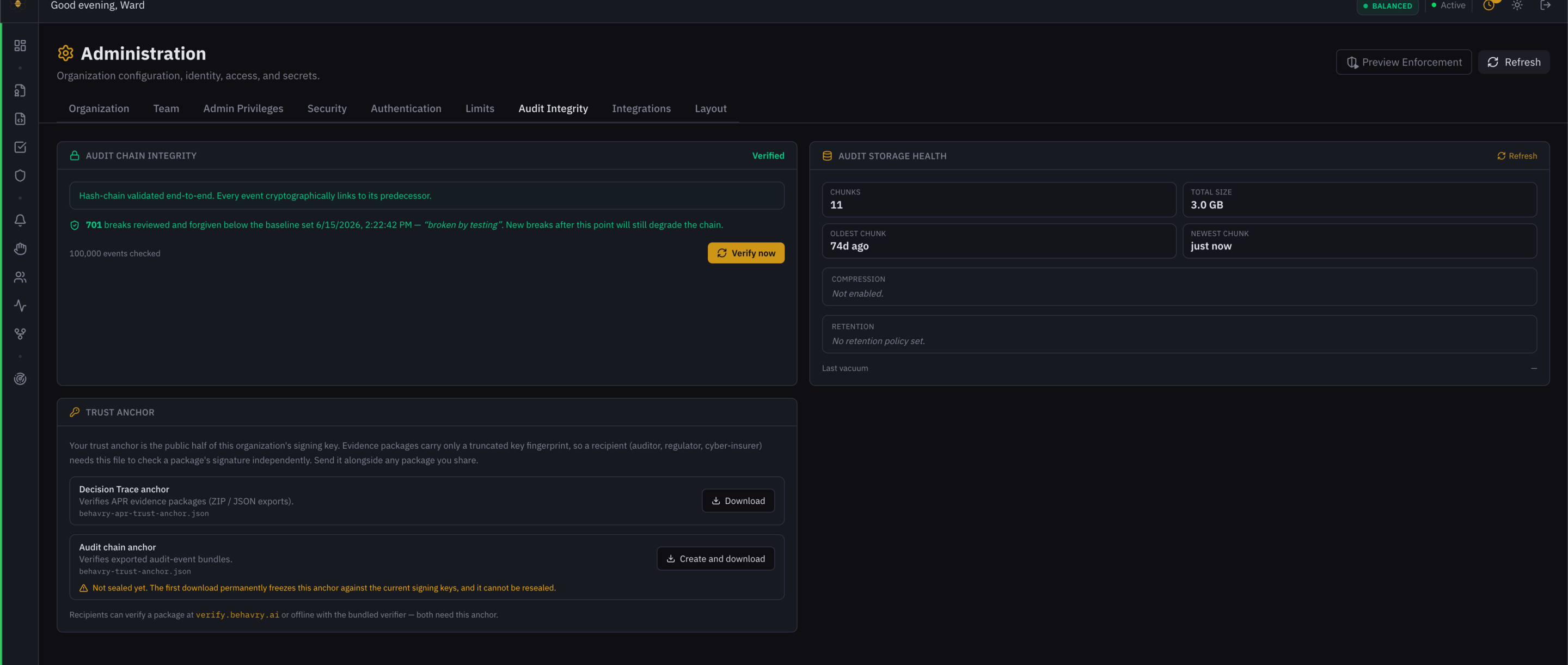 The Trust Anchor panel. The audit chain anchor carries the amber warning because its first download is irreversible; the Decision Trace anchor is a plain read.
Downloading one seals it
There are two anchors behind that panel, and they are not the same kind of thing:
| Anchor | File | Verifies | Behaviour |
|---|---|---|---|
| Decision Trace anchor | behavry-apr-trust-anchor.json | APR evidence packages (ZIP / JSON exports) | A pure read. Download freely. |
| Audit chain anchor | behavry-trust-anchor.json | Exported audit-event bundles | The first download freezes it. |
The audit chain anchor is sealed on first retrieval against whatever signer keys exist at that moment, and there is no reseal surface. In practice the first download is irreversible — the panel says so in an amber warning above the button.
Nothing secret is exposed — an anchor is a public key. The risk is operational: the wrong person can freeze the anchor at the wrong moment, with no recovery.
So sealing requires two things:
- Full write authority. Deliberately stricter than "not a viewer" —
analyst(read-only) andpolicy_author(policies and DLP only) are both refused, and an administrator with no explicit privilege assignment does not slip through on a legacy-role fallback. - An explicit confirmation. The dashboard button reads Create and download on an unsealed anchor and opens a confirmation spelling out that it cannot be resealed. Without confirmation the API returns 409 with an explanation rather than silently sealing.
Once sealed, the read is exactly as before and stays open to viewers — which is the case that matters for a compliance viewer assembling an auditor package. A sealed anchor shows its seal date and downloads in one click.
It fails closed — treating the state as "might seal" and keeping the confirmation — rather than assuming sealed and offering one-click. That is the behaviour on an older data plane.
| Endpoint | Purpose |
|---|---|
GET /api/v1/admin/trust-anchor/status | {sealed, sealed_at} |
GET /api/v1/admin/trust-anchor?confirm_seal=true | Seal (first call) and download |
GET /api/v1/admin/apr-trust-anchor | APR anchor — pure read |
Related
- Decision Trace — where the hash comes from
- Audit Integrity — the chain mechanism
- Credential Broker — the
credential_custody.jsonpackage component - Admin Privileges — the authority required to seal
- SIEM Connectors — forward hashes into your SIEM so you can cross-verify