Overview & Dashboards
The Overview is where you start the day. It answers one question fast — is everything under control right now? — and points you at whatever isn't. It's the first icon in the sidebar and has two tabs: Home and Dashboards.
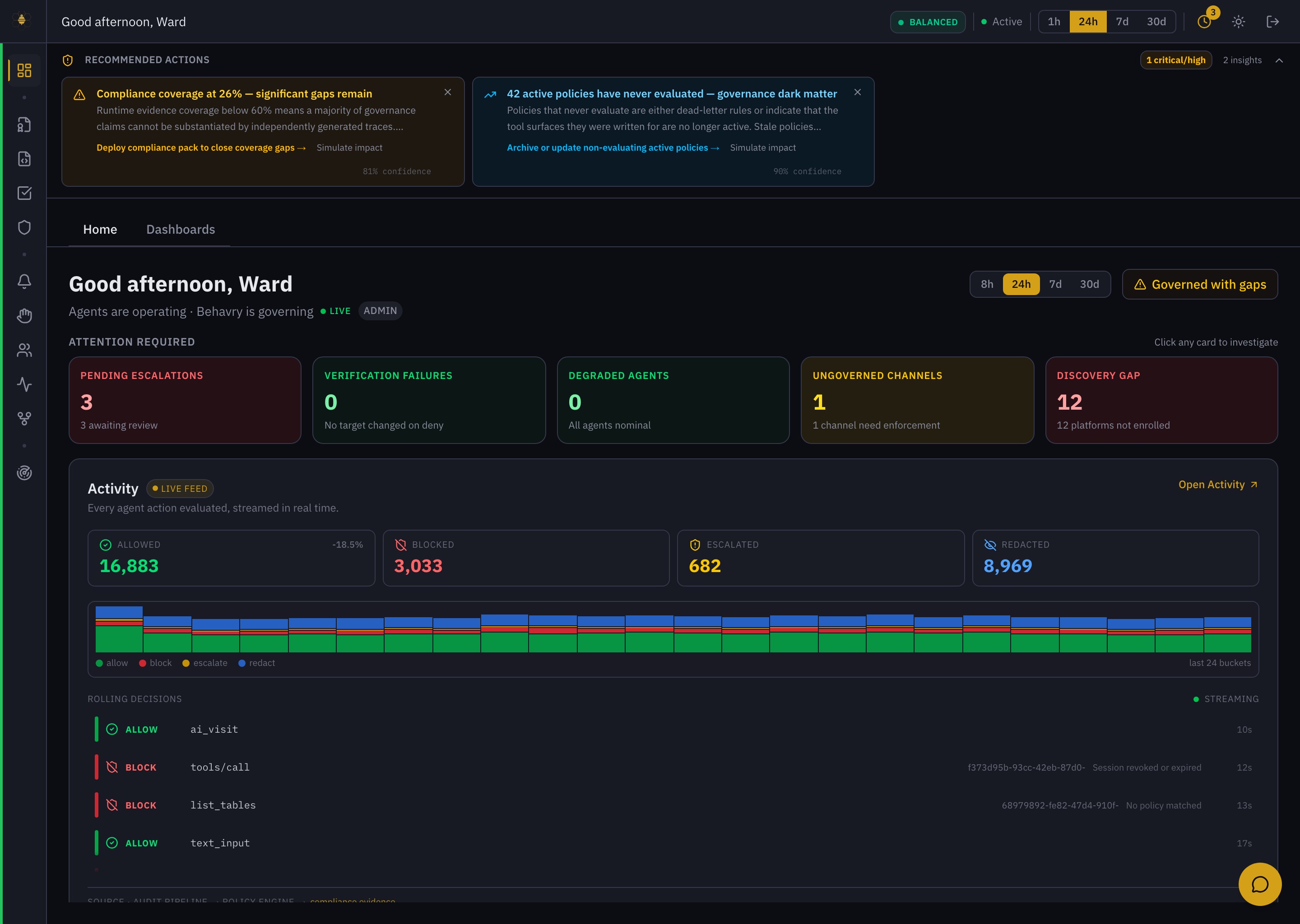 Overview → Home — posture, Recommended Actions, the Attention Required cards, and the live decision feed.
Reading the Home tab
Governance posture (top-right) is the one-glance verdict: Governed, Governed with gaps, and so on. Next to it, the period switch (8h / 24h / 7d / 30d) scopes everything on the page.
Recommended Actions are ranked insights with a confidence score and a one-click follow-up — for example "Compliance coverage at 26% — significant gaps remain" or "42 active policies have never evaluated — governance dark matter." Each offers Simulate impact before you act.
Attention Required is the triage row. Every card is a live count and a link — "click any card to investigate":
| Card | What it means | Where it takes you |
|---|---|---|
| Pending Escalations | Actions held for human approval | Escalations |
| Verification Failures | A target changed after a deny (tamper signal) | Decision Traces |
| Degraded Agents | Agents not nominal | Agents |
| Ungoverned Channels | A channel that needs enforcement | Provisioning |
| Discovery Gap | Platforms discovered but not enrolled | AI Exposure |
Activity (live feed) is every governed action, streamed. The four counters — Allowed / Blocked / Escalated / Redacted — trend over the window, the bar chart shows the mix across the last 24 buckets, and Rolling Decisions streams individual outcomes (ALLOW ai_visit, BLOCK list_tables · No policy matched) with the session ID and reason. It's the pulse of the fleet.
Below that, panels summarize Recent Enforced Actions, Agents, Drift, Compliance (mapped controls + audit-chain status), and System Health (OPA, database, WebSocket, SIEM, queue depth).
A morning routine
- Read the posture pill and the period switch — set the window you care about.
- Scan Attention Required left to right. Any non-zero card is a lead; click it to investigate.
- Skim Recommended Actions — accept, dismiss, or Simulate impact.
- Glance at the Activity mix. A sudden spike in Blocked or Escalated is worth a click into Decision Traces or Alerts.
The Dashboards tab
Switch to Dashboards for configurable, persona-oriented widget boards. Each user gets their own grid, and super-admins can publish CIO / CTO / CISO persona templates as starting points. Build a board from the widget catalog to keep the metrics you care about in one place. See Widget Dashboard.
The Overview is designed to be left quickly. Nothing here is where you do work — every card, counter, and feed row links to the surface where you act on it.