Agent Roles (RBAC)
Roles are how you control what an enrolled agent may do. A role is a permission token — for example database:read — that your policy rules match. Assigning roles at enrollment is what moves an agent from "fully denied" to "can do exactly these things."
Manage roles under Administration → Agent Roles. The tab lists every role and lets you create new ones with New role. You can also create a role inline during enrollment (+ New role in the Identity step).
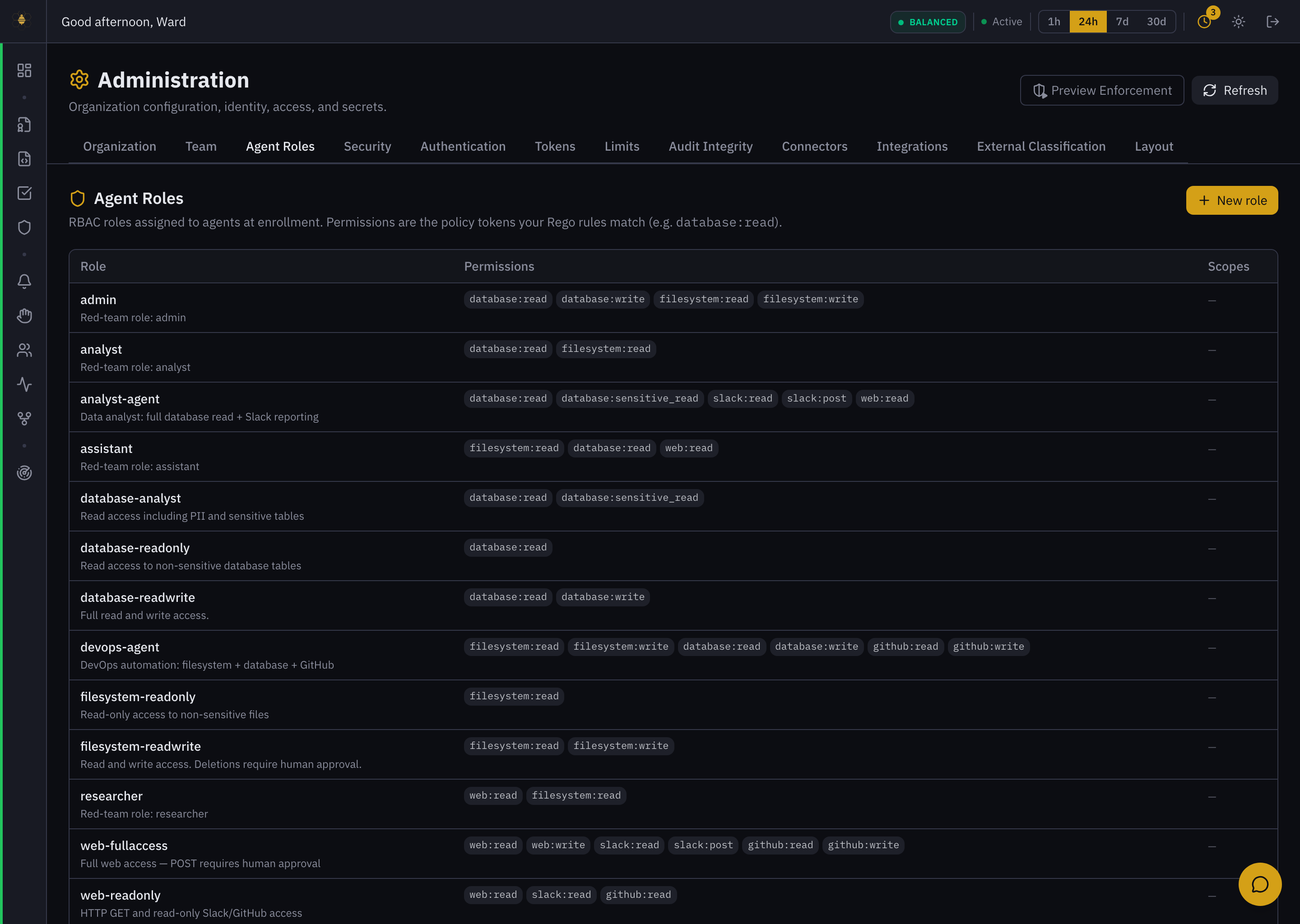 Administration → Agent Roles — roles are policy tokens (e.g.
 database:read), assigned to agents at enrollment.
The least-privilege workflow
- Define roles that map to real jobs — e.g.
reader(database:read),reviewer(repo:read,pr:comment). - Assign the narrowest set that lets the agent do its task at enrollment (Step 1, Identity).
- Widen deliberately: if the agent is blocked doing legitimate work, add the specific role, not a broad one.
- Revisit periodically — remove roles an agent no longer needs.
This is intentional. An agent with no roles cannot act until you grant one. If "everything is denied," check the agent's roles first (see Troubleshooting).
Agent roles control what enrolled agents may do. Team roles (viewer, analyst, policy author, admin, msp operator) control human access to the dashboard and are managed under Administration → Team — see Administration and User Roles. They are separate systems.