Enrolling Agents
Use Agent Enrollment for an autonomous agent — Claude Code, ChatGPT / OpenAI, the Python or TypeScript SDK, or a custom MCP client. Enrollment mints the agent an identity and roles, then hands back a single copy-paste command that wires it to Behavry. There is no JSON to hand-edit.
From Provisioning, choose Agent Enrollment ("Issue agent token"). A four-step drawer opens.
The four steps
- Identity. Give the agent a name and assign one or more roles. Leaving roles empty enrolls the agent fully denied — you can grant roles now or later.
- Connection. Choose the runtime: Custom MCP Client, Claude Code, Claude Desktop, OpenAI (ChatGPT / Codex), Open Interpreter, Python SDK, or TypeScript SDK.
- Issue token. Behavry provisions the identity and shows a Config block — one command. Use the macOS / Linux · Windows switch to get the right form, then Copy it and run it where the agent runs.
- Verify. Keep the drawer open. Behavry watches for the agent's first call and confirms the connection live ("Waiting for connection…" until it arrives).
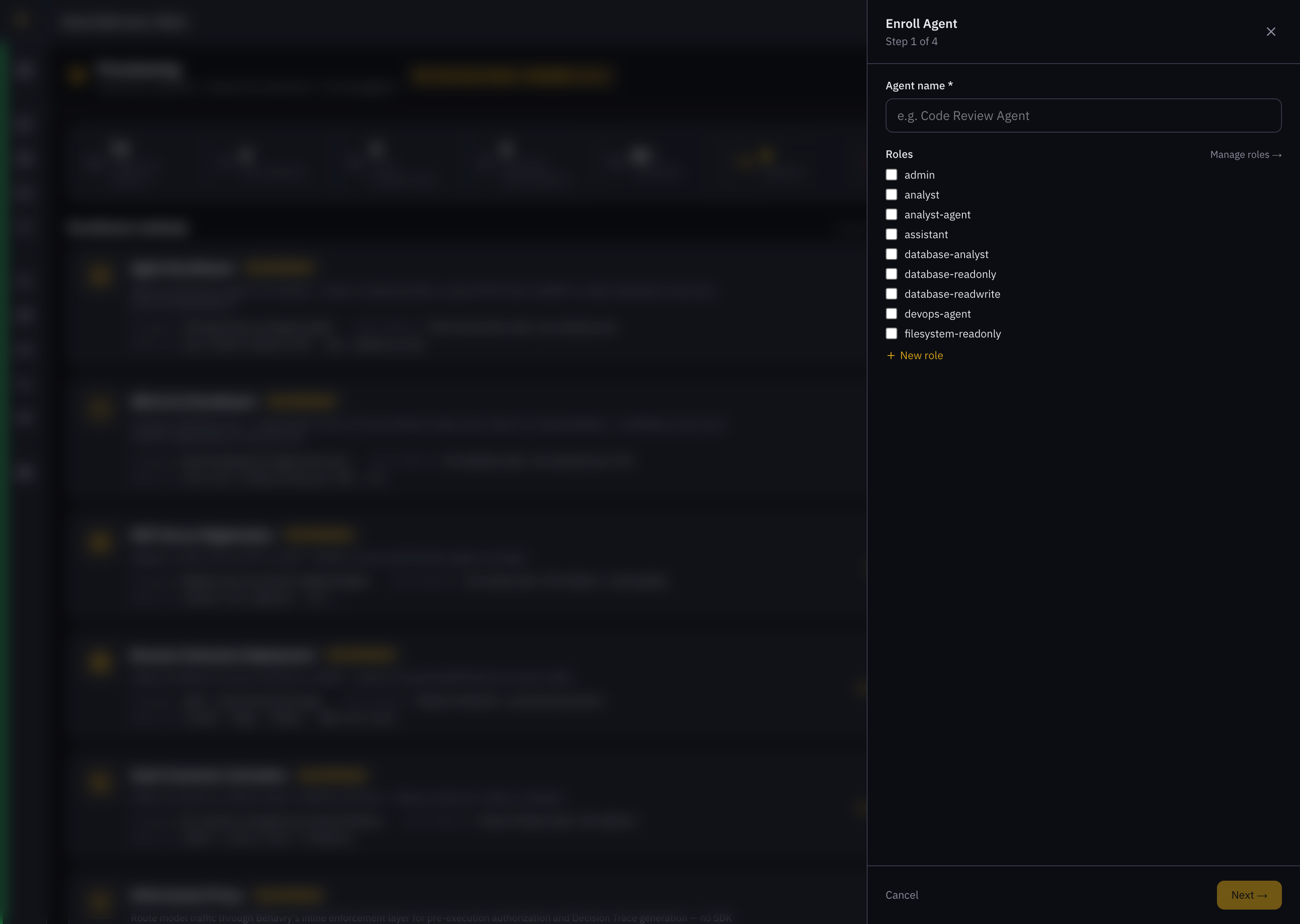 Enroll Agent — Step 1 (Identity: name + roles) and, next, Step 2 (Client type picker).
What the command looks like
For Claude Code, the Config block registers Behavry as a user-scope MCP server. Substitute your tenant; the real command carries a Basic-auth credential in place of the placeholder below:
claude mcp remove behavry --scope user 2>/dev/null; \
claude mcp add --transport http --scope user behavry \
  https://<tenant>.behavry.ai/mcp/v1 \
  --header "Authorization: Basic <base64(client_id:client_secret)>"
Prefer not to embed a static token? Claude Code also supports browser sign-in. Run the same command without the --header, then in Claude Code run /mcp and choose Authenticate to log in via OAuth 2.1:
claude mcp add --transport http --scope user behavry \
  https://<tenant>.behavry.ai/mcp/v1
# then, inside Claude Code:  /mcp  →  Authenticate
What each runtime does
| Runtime | What the command does |
|---|---|
| Claude Code | claude mcp add registers Behavry as a user-scope MCP server. Cross-platform (Windows swaps 2>/dev/null for 2>$null). Browser-login OAuth is offered as an alternative to a static token. |
| OpenAI (ChatGPT / Codex) | Writes the BEHAVRY_* credentials — to ~/.behavry/env on macOS / Linux, or as user environment variables on Windows — for whichever bridge routes the agent's calls through Behavry. |
| Python / TypeScript SDK | Same BEHAVRY_* credentials. Source them from your shell rc so behavry-sdk / @behavry/sdk picks them up each session. |
| Custom MCP Client | A diagnostic curl to confirm connectivity, then wire the proxy URL and Basic authorization header into your client by hand. |
- MCP proxy endpoint:
https://<tenant>.behavry.ai/mcp/v1 - Authorization header:
Authorization: Basic base64(client_id:client_secret) - Environment variables:
BEHAVRY_PROXY_URL,BEHAVRY_CLIENT_ID,BEHAVRY_CLIENT_SECRET - Roles: assigned in Step 1. Empty = all denies (least privilege).
Verify the connection
Once the agent makes its first call, Step 4 flips to Connected, the agent appears on the Agents page with its roles and a live status, and its calls stream into Decision Traces.
One-line onboarding from the CLI
behavry agent connect is the same provisioning path with a smaller request surface — one endpoint printed prominently, and the granted posture stated next to it.
behavry agent connect my-agent
It delegates to the same provisioning the dashboard uses, under the same admin authority. It adds no new mechanism and no new trust boundary.
The posture prints unprompted
The response carries a posture block — autonomy level and its label, allowed zones, and whether Decision Trace is on — and the CLI prints it without a flag.
An onboarding path that hands over an endpoint and says nothing about what was granted is how "one line to deploy" quietly becomes "one line to ungoverned".
New agents land at the tenant default
A newly created agent takes your tenant's default_autonomy_level. See Autonomy Levels.
Zone scoping needs no equivalent setting: a NULL allowed_zones reads as the default internal grant, so a new agent is scoped without anyone writing a value. See Security Zones.
The frictionless extreme is an unauthenticated enrollment secret that lets an agent self-register. That is a real design with real requirements — single use, TTL, rotation, revocation, rate limiting, and an abuse story for a leaked secret — and it deserves its own security review rather than arriving inline. connect requires the same admin authority provisioning always has, and unattended enrollment remains an explicit non-goal.
Swapping an endpoint
For a runtime that already speaks an LLM API, onboarding is a one-line base_url change. Two caveats are worth stating rather than glossing:
- Zone scoping enforces only once Security Zones are deployed and a target has been confirmed by an admin.
- The OpenAI, Anthropic, and Gemini proxy routes still carry the agent's own API key. Those calls are governed and traced, but they are not credential-brokered — see Credential Broker.