Escalations
When a policy decides to escalate instead of allowing or blocking, the action is held and lands in the Escalation Queue. Nothing happens until a human approves or denies it. This is where operators spend real time, so it's worth knowing cold.
Open Escalations in the sidebar (Runtime group). The header shows the pending count; tabs split the work into Pending, History, and Quarantine.
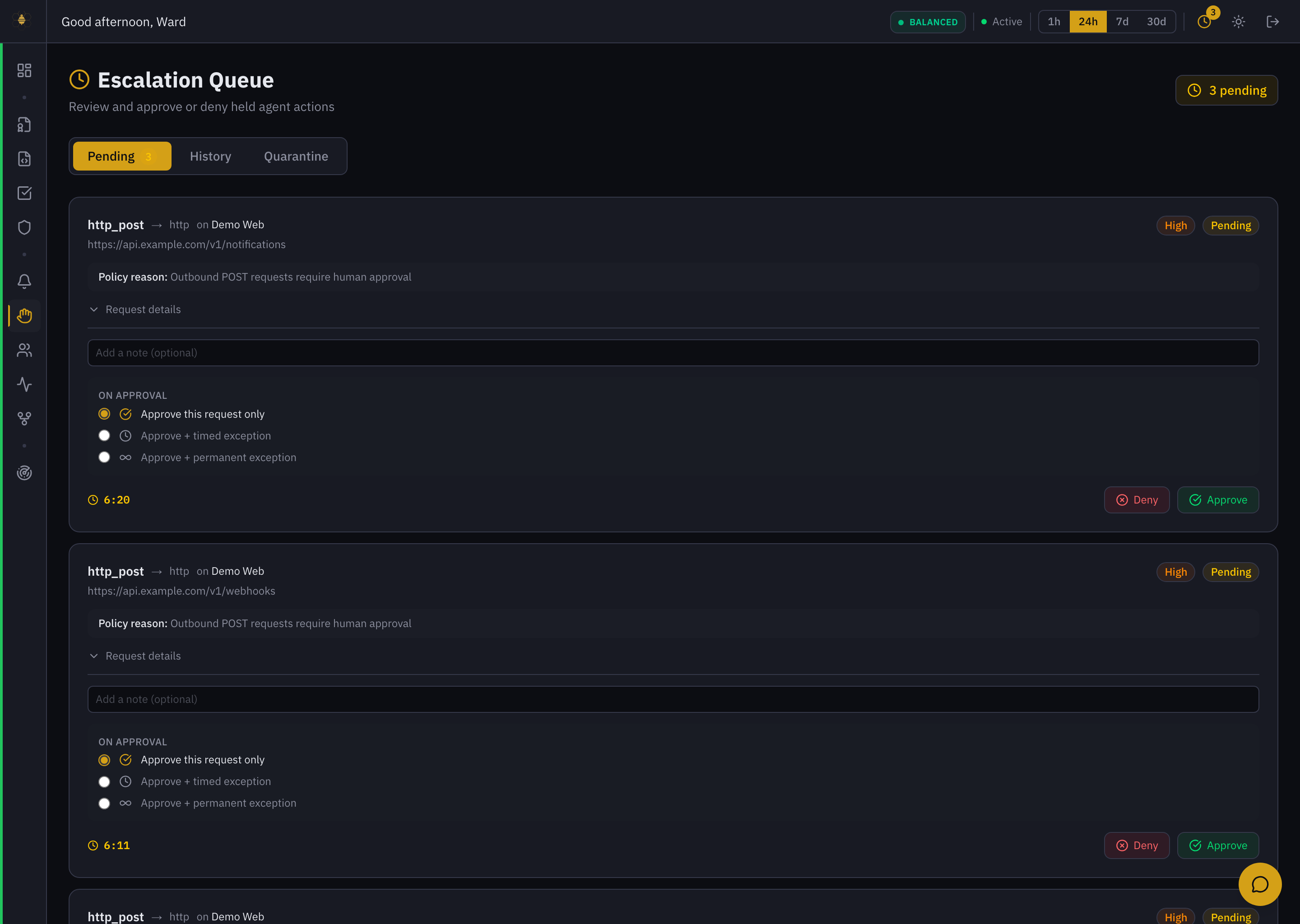 Escalation Queue — each held action is a card with its policy reason, request details, approval scope, and Approve / Deny.
Reading an escalation
Each pending item is a self-contained card. From the example above — an outbound http_post on the Demo Web surface:
- The action — the tool and target (
http_post → http on Demo Web) and the specific request (the destination URL). - Policy reason — why it was held, in the policy author's words: "Outbound POST requests require human approval." This is the single most important line; it tells you what decision you're actually being asked to make.
- Request details — expand to see the full request the agent wants to make before you decide.
- Severity and a countdown timer — how urgent it is, and how long before it auto-resolves (see below).
Approving or denying
Add an optional note (it's recorded on the decision), then choose. On approval you pick the scope — this is the part most people miss:
| On approval | What it does |
|---|---|
| Approve this request only | Lets this one action through. The next identical request is held again. Safest default. |
| Approve + timed exception | Allows this class of action for a bounded window, so you're not re-approving the same thing every few minutes. |
| Approve + permanent exception | Allows it going forward. Use sparingly — this is effectively editing policy from the queue. |
Then Approve or Deny. The agent receives the outcome and continues (or is refused). Every decision — who, when, the note, and the scope — is written to the Decision Trace.
Granting a permanent exception widens what every future agent can do on that surface. Prefer this request only or a timed exception, and make permanent changes deliberately in Policies where they're reviewed.
Timers, History, and Quarantine
- Countdown / auto-resolve. Each escalation has an SLA. If no one decides in time it auto-resolves (typically a deny) so an agent isn't blocked forever waiting on a person. The timer on each card shows the remaining time.
- History — every past escalation and how it was resolved. Your audit trail for "who approved that, and why."
- Quarantine — agents that have been pulled out of service pending review, rather than individual held actions.
Staying ahead of the queue
- The topbar carries a pending-escalation indicator on every page, so you see a backlog forming without sitting on this screen.
- The Overview's Pending Escalations attention card and the Alert Center both surface "escalation queue building up" when approvers are falling behind.
See Alerts & Escalations for how escalation policies are defined.