Signing In & the Dashboard
Signing in
Behavry is reached at your tenant URL, for example https://acme.behavry.ai. Two sign-in modes exist, set per tenant:
- Username / password. The default. Enter your admin username (often
admin) and password. Passwords are a minimum of 12 characters and can be rotated under Administration → Team. - Single sign-on (SSO). If your tenant is wired to an identity provider (OIDC), you sign in through it instead. SSO status is shown under Administration → Organization ("IDP / SSO").
If you authenticate but land on "Account not provisioned," your identity signed in but is not yet an administrator of that tenant. Use Sign out and clear local state, then have your Behavry contact provision your account. See Troubleshooting.
For how accounts differ across the docs, demo, and commercial surfaces, see Accounts & Sign-In.
The shell
Every page shares the same frame: a slim icon rail on the left, a topbar across the top, and the content area between them.
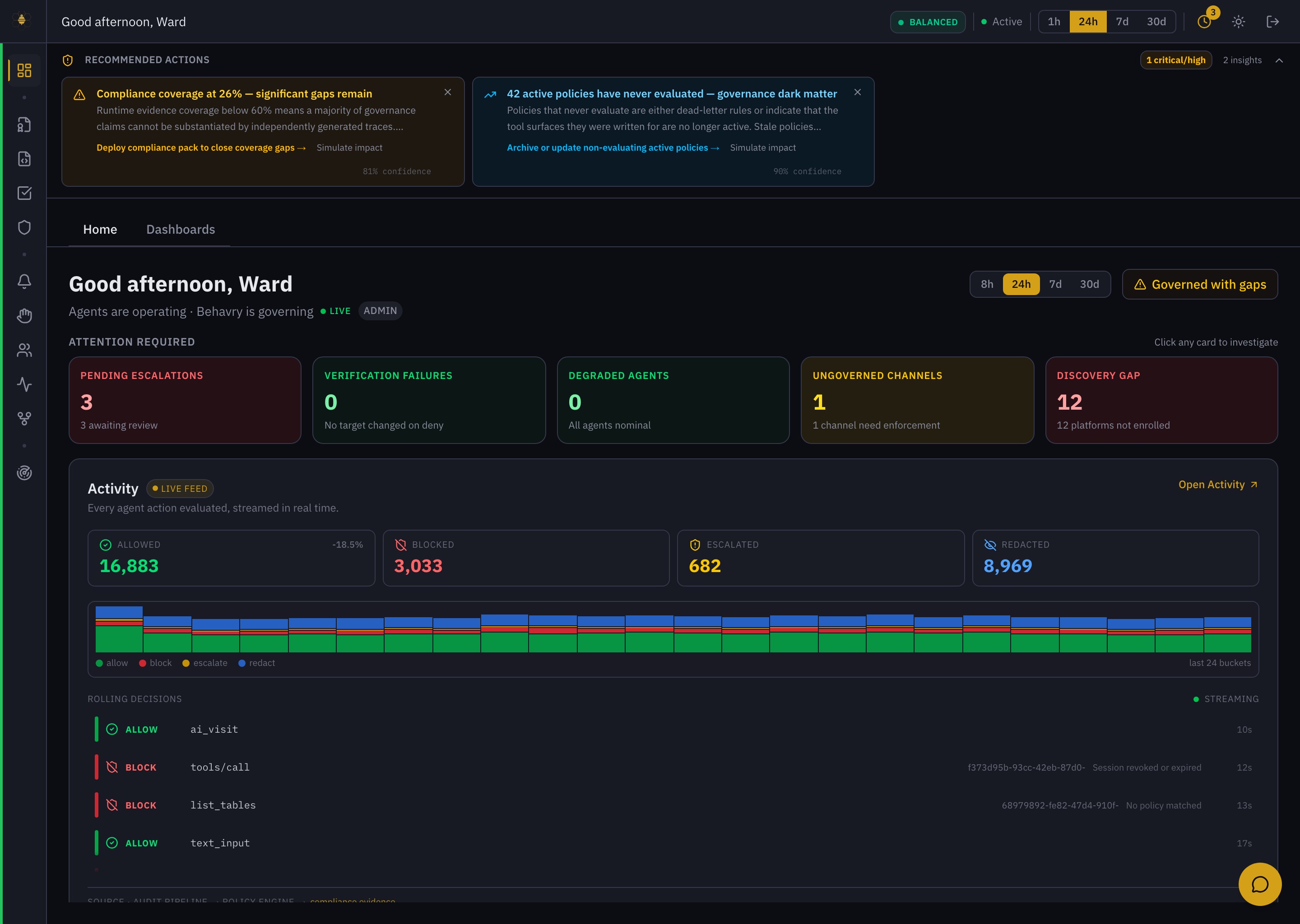 The signed-in shell — icon sidebar (left), topbar with the governance-posture pill and period switch (top), Overview content (center).
The sidebar
The left rail is a compact icon column. Icons are grouped; hovering any icon shows its label. The groups, top to bottom:
| Group | What lives there |
|---|---|
| (top) | Overview — your home base: posture, attention cards, and the live decision feed. |
| Governance | Decision Traces · Policies · Compliance · Operational Exposure. |
| Runtime | Alerts · Escalations · Agents · Sessions · Workflows. |
| Discovery | AI Exposure — where AI is used across the organization. |
| More | Operations · Support & Status · Administration · Provisioning · FinOps · Exchange · Planning. |
| Advanced | Runtime Graph · Adaptive Defense · Runtime Intelligence · Enforcement Mesh (shown on runtime-enabled tenants). |
| Fleet | Super Admin · Support Console (super-admins only). |
A few surfaces are labeled by outcome rather than mechanism: Decision Traces is the audit log, Operational Exposure is agent/session risk, AI Exposure is organization-wide discovery, Exchange is the content library, FinOps is AI cost, and Administration is settings. This documentation uses the labels you see in the product.
The topbar
The topbar carries global controls and status:
- Greeting — a time-of-day greeting with your name.
- Governance posture pill — an at-a-glance mode such as
BALANCED, showing how aggressively policy is enforced. - System status — Active / Idle / degraded; click it for health details.
- Period switch —
1h / 24h / 7d / 30d; sets the time window for the data on screen. - History, theme, and sign-out — a clock (recent view history), a light/dark theme toggle, and log out.
Hubs and tabs
Many icons open a hub — a page with tabs for related features. Overview has Home and Dashboards; Agents leads to Sessions and Workflows; Administration is a row of tabs (Organization, Team, Agent Roles, Tokens, and more). URLs are shareable, so you can link a colleague straight to a tab. The Overview → Dashboards tab is a per-user Widget Dashboard with CIO / CTO / CISO persona templates.
A copilot button sits in the bottom-right of every page. Click it to ask Behavry — in plain language — what something means or how to do it, using your live data. See Ask Behavry.