Policies
Policies is the "live enforcement control plane" — the rules that decide every agent action in real time. Open it from the Governance group in the sidebar. It's a hub with tabs: Policies · DLP Rules · Inbound Rules · Context Gate · Suggestions. This page covers the Policies tab; the others have their own pages.
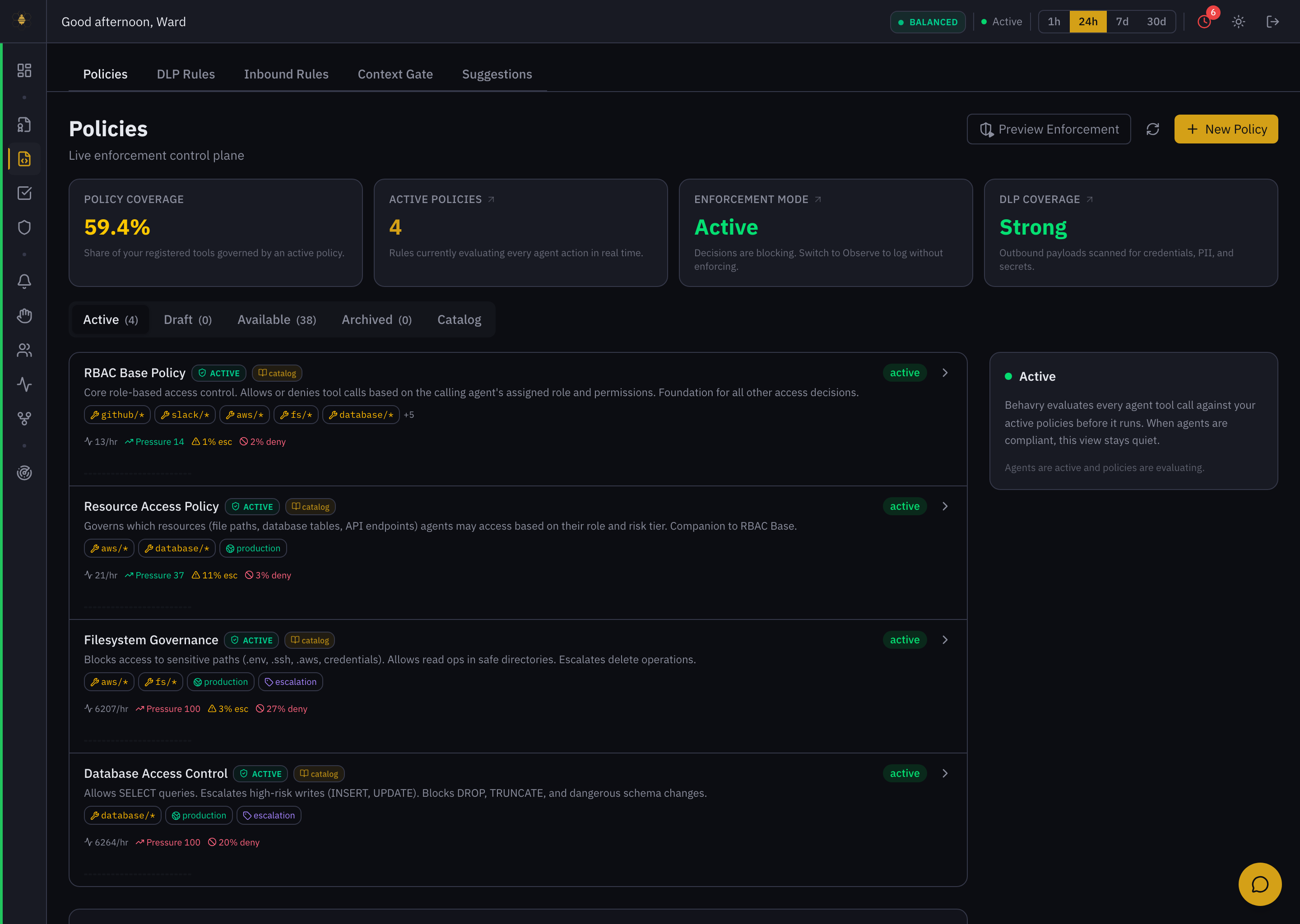 Policies — coverage, enforcement mode, and the active-policy list with per-policy pressure, escalation, and deny rates.
Reading the control plane
Four cards summarize your posture:
- Policy Coverage — the share of your registered tools governed by an active policy. Un-covered tools fall through to the default-deny floor.
- Active Policies — how many rules are evaluating every action right now.
- Enforcement Mode — Active (decisions block) or Observe (decisions are logged but not enforced). Observe is how you roll out a policy safely — see it fire against real traffic before it can block anything.
- DLP Coverage — the strength of outbound scanning (see DLP Rules).
Policies are grouped by lifecycle: Active · Draft · Available · Archived · Catalog. Each active-policy card shows its scope (github/*, database/*, …), its mode (production, escalation), and live stats — throughput, pressure, % escalated, and % deny. A policy with a high deny rate and high pressure (e.g. Filesystem Governance at 27% deny) is doing a lot of work; one that never fires may be dead weight (see Suggestions and the "never-evaluated" Overview insight).
How a decision is made
Every action flows through the same four stages:
- Agent — an agent invokes a tool call (read a file, query a database, post a message). Every action is intercepted before execution.
- Policy Evaluation — the OPA engine evaluates the action against your active Rego policies, checking agent role, resource type, risk tier, and context. Evaluation typically completes in under 5 ms.
- Decision — OPA returns allow, deny, or escalate, logged with a reason code.
- Enforcement — the proxy enforces the decision before the call reaches its target. Blocked actions never reach the destination; escalated actions are queued until an approver acts.
Behavry ships a catalog of ready-made policies (RBAC base, resource access, filesystem governance, database access control, …). You install and scope those. Rego is there when you need it — Suggestions even generates candidate rules for you — but day-to-day operation is install, scope, and activate. See Policy Engine and Policy Writer.
Authoring and rolling out a policy
- Start from the catalog (or New Policy). The catalog covers the common governance stories; a custom policy is a Rego rule you author or adapt.
- Scope it to the tools/resources it should govern (
database/*,fs/*, a specific MCP server). - Roll out in Observe first. Switch Enforcement Mode to Observe, or keep the policy in Draft, and watch it evaluate against live traffic without blocking. Preview Enforcement shows what would happen.
- Activate. Move it to Active so it enforces.
- Retire deliberately. Move a policy to Archived when it's superseded. Archived policies keep their history for audit.
Every activation, edit, and archive is recorded, so the policy set's evolution is itself auditable.
Related
- DLP Rules · Inbound Rules · Context Gate · Suggestions
- Policy Engine · Policy Writer · Policy Automation
- Agent Roles — the tokens your policy rules match