Policy Suggestions
Behavry doesn't just enforce the policy you write — it proposes new policy from what it sees. The Suggestions tab (Policies → Suggestions) is where auto-generated candidate policies land for you to review, edit, and activate. It's how the system gets permanently stronger from its own detections.
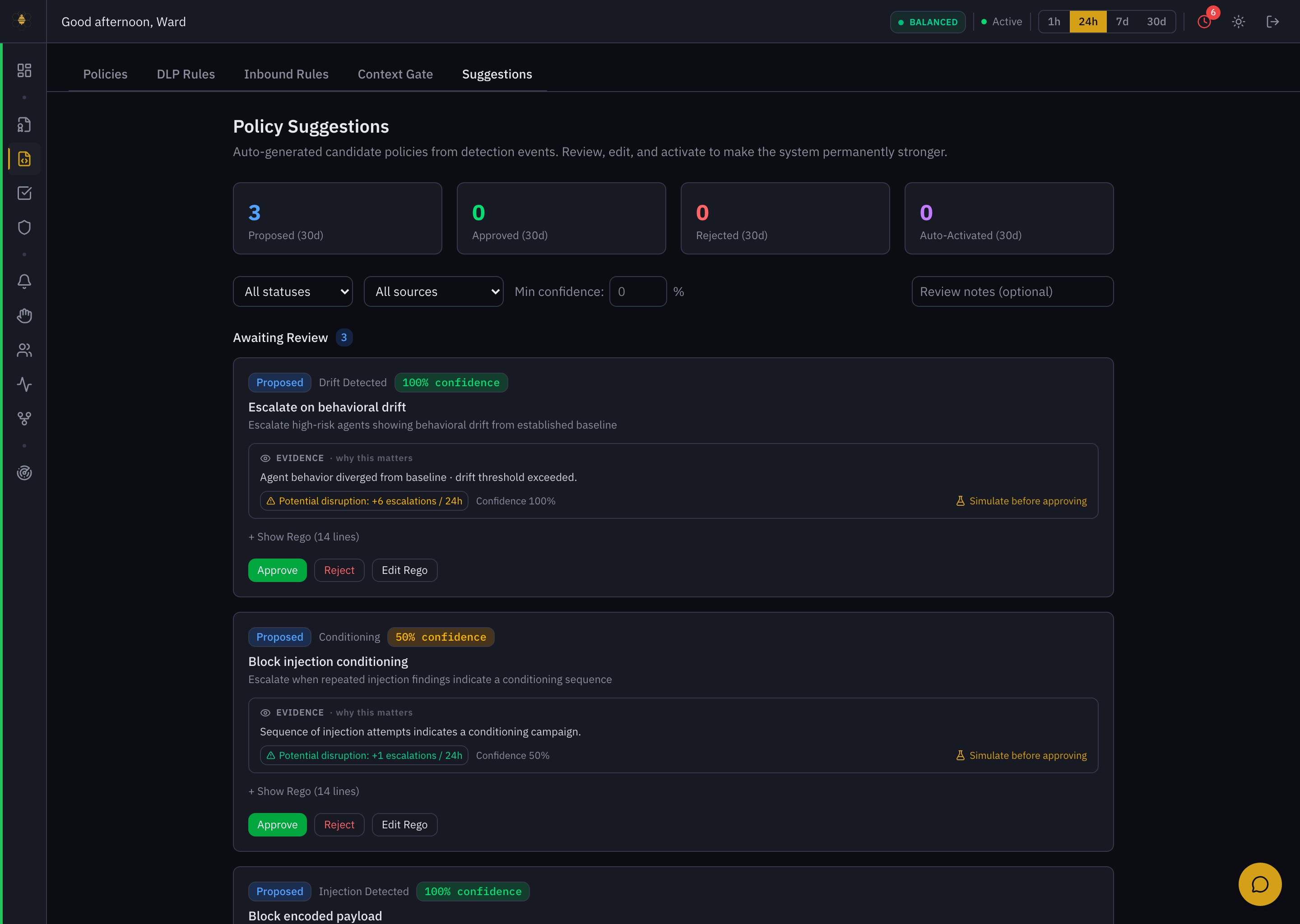 Policy Suggestions — candidate rules from detection events, each with evidence, confidence, projected impact, and Approve / Reject / Edit Rego.
Where suggestions come from
Each candidate is generated from a detection event and tagged with its source:
- Injection Detected / Blocked — a rule to block a prompt-injection pattern seen on an inbound surface.
- Conditioning — repeated injection findings that look like a deliberate conditioning campaign.
- Drift Detected — an agent diverging from its behavioral baseline.
- Behavior Reversal — a sudden change in an agent's established pattern.
The counters at the top track Proposed / Approved / Rejected / Auto-Activated over the last 30 days. Filter by status, source, or minimum confidence.
Reading a candidate
Each suggestion card gives you everything needed to make a call:
- Title & description — e.g. "Escalate on behavioral drift — escalate high-risk agents showing behavioral drift from established baseline."
- Confidence — how sure Behavry is (50%–100%).
- Evidence — "why this matters" — the observation that produced the rule ("Agent behavior diverged from baseline · drift threshold exceeded"), and the affected systems (
http/*). - Potential disruption — the projected operational cost if you activate it (e.g. +6 escalations / 24h), so you're not blindsided.
- Show Rego — the exact rule it would install, inline.
The review workflow
- Read the evidence and the projected disruption. A 100%-confidence drift rule that adds +6 escalations/24h is a real change to your queue load — decide if that's acceptable.
- Simulate before approving. Run the candidate against live traffic to see what it would have decided, without enforcing.
- Edit if needed. Edit Rego lets you tighten scope or thresholds before it goes live.
- Approve (it becomes an active policy) or Reject (with an optional review note for the audit trail).
An approved suggestion becomes a live rule that enforces on every matching action. Treat it with the same care as authoring a policy by hand — simulate first, and prefer a scoped rule over a broad one.
Approvals, rejections, and edits are all recorded, so the evolution of your policy set — including what the system proposed and what you chose — stays auditable. See Policy Automation for how candidates are generated.